Serilog.Formatting.Compact.Reader 4.1.0-dev-00085
Serilog.Formatting.Compact.Reader 

This package reads (deserializes) JSON log files created by Serilog.Formatting.Compact back into Serilog LogEvents.
Example
Log events are written to a file using CompactJsonFormatter:
await using var fileLog = new LoggerConfiguration()
    .WriteTo.File(new CompactJsonFormatter(), "log.clef")
    .CreateLogger();

fileLog.Information("Hello, {@User}", new { Name = "nblumhardt", Id = 101 });
fileLog.Information("Number {N:x8}", 42);
fileLog.Warning("Tags are {Tags}", new[] { "test", "orange" });

try
{
    throw new DivideByZeroException();
}
catch(Exception ex)
{
    fileLog.Error(ex, "Something failed");
}
This creates a log file with content similar to:
{"@t":"2024-10-12T04:46:58.0554314Z","@mt":"Hello, {@User}","User":{"Name":"nblumhardt","Id":101}}
{"@t":"2024-10-12T04:46:58.0684369Z","@mt":"Number {N:x8}","@r":["0000002a"],"N":42}
{"@t":"2024-10-12T04:46:58.0724384Z","@mt":"Tags are {Tags}","@l":"Warning","Tags":["test","orange"]}
{"@t":"2024-10-12T04:46:58.0904378Z","@mt":"Something failed","@l":"Error", "@x":"System.DivideByZer...<snip>"}
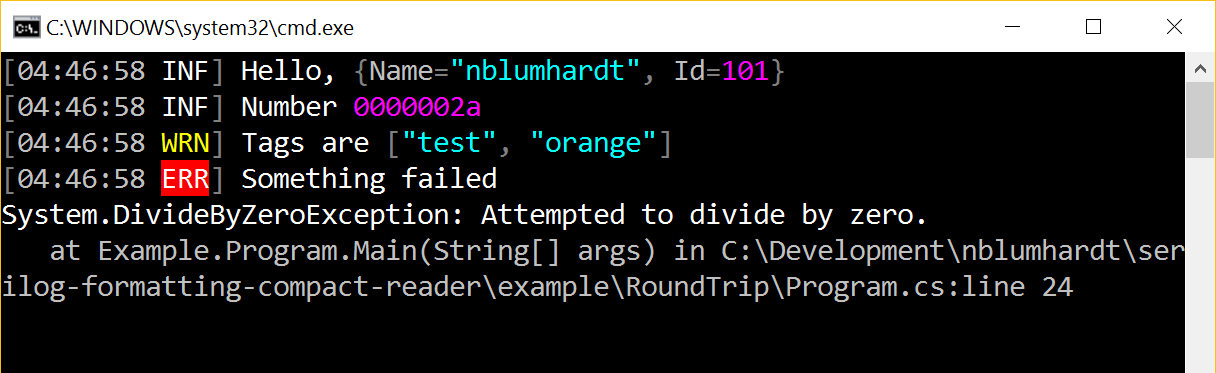
An instance of LogEventReader converts each line of the log file back into a LogEvent, which can be manipulated, rendered, or written through another Serilog sink:
await using var console = new LoggerConfiguration()
    .WriteTo.Console()
    .CreateLogger();

await using var clef = File.OpenText("log.clef"))

var reader = new LogEventReader(clef);

while (reader.TryRead(out var evt))
    console.Write(evt);
Output from the logger:
Limitations
Events deserialized from JSON are for typical purposes just like the original log events. There are two main things to keep in mind:
- JSON doesn't carry all of the type information necessary to determine if, for example, a number is an
intor afloat. JSON.NET does a good job of deserializing anything that it encounters, but you can't rely on the types here being identical. - Exceptions deserialized this way aren't instances of the original exception type - all you can do with them is call
ToString()to get the formatted message and stack trace, which is what 99% of Serilog sinks will do.
Showing the top 20 packages that depend on Serilog.Formatting.Compact.Reader.
| Packages | Downloads |
|---|---|
|
UmbracoCms.Core
Contains the core assemblies needed to run Umbraco Cms. This package only contains assemblies and can be used for package development. Use the UmbracoCms package to setup Umbraco in Visual Studio as an ASP.NET project.
|
42 |
|
Umbraco.Cms.Infrastructure
Contains the infrastructure assembly needed to run Umbraco CMS.
|
41 |
|
UmbracoCms.Core
Contains the core assemblies needed to run Umbraco Cms. This package only contains assemblies and can be used for package development. Use the UmbracoCms package to setup Umbraco in Visual Studio as an ASP.NET project.
|
41 |
|
Umbraco.Cms.Infrastructure
Contains the infrastructure assembly needed to run Umbraco Cms. This package only contains the assembly, and can be used for package development. Use the template in the Umbraco.Templates package to setup Umbraco
|
40 |
|
Umbraco.Cms.Infrastructure
Contains the infrastructure assembly needed to run Umbraco CMS.
|
40 |
|
UmbracoCms.Core
Contains the core assemblies needed to run Umbraco Cms. This package only contains assemblies and can be used for package development. Use the UmbracoCms package to setup Umbraco in Visual Studio as an ASP.NET project.
|
40 |
|
UmbracoCms.Core
Contains the core assemblies needed to run Umbraco Cms. This package only contains assemblies and can be used for package development. Use the UmbracoCms package to setup Umbraco in Visual Studio as an ASP.NET project.
|
39 |
|
Umbraco.Cms.Infrastructure
Contains the infrastructure assembly needed to run Umbraco CMS.
|
38 |
|
UmbracoCms.Core
Contains the core assemblies needed to run Umbraco Cms. This package only contains assemblies and can be used for package development. Use the UmbracoCms package to setup Umbraco in Visual Studio as an ASP.NET project.
|
38 |
|
Umbraco.Cms.Infrastructure
Contains the infrastructure assembly needed to run Umbraco CMS.
|
37 |
|
UmbracoCms.Core
Contains the core assemblies needed to run Umbraco Cms. This package only contains assemblies and can be used for package development. Use the UmbracoCms package to setup Umbraco in Visual Studio as an ASP.NET project.
|
37 |
|
Umbraco.Cms.Infrastructure
Contains the infrastructure assembly needed to run Umbraco Cms. This package only contains the assembly, and can be used for package development. Use the template in the Umbraco.Templates package to setup Umbraco
|
36 |
.NET Framework 4.6.2
- Newtonsoft.Json (>= 13.0.3)
- Serilog (>= 4.0.0)
.NET Framework 4.7.1
- Newtonsoft.Json (>= 13.0.3)
- Serilog (>= 4.0.0)
.NET 6.0
- Newtonsoft.Json (>= 13.0.3)
- Serilog (>= 4.0.0)
.NET 8.0
- Newtonsoft.Json (>= 13.0.3)
- Serilog (>= 4.0.0)
.NET Standard 2.0
- Newtonsoft.Json (>= 13.0.3)
- Serilog (>= 4.0.0)
| Version | Downloads | Last updated |
|---|---|---|
| 4.1.0-dev-00085 | 29 | 08/29/2024 |
| 4.1.0-dev-00082 | 10 | 06/25/2026 |
| 4.0.1-dev-00081 | 16 | 08/29/2024 |
| 4.0.1-dev-00079 | 8 | 06/25/2026 |
| 4.0.0 | 21 | 07/30/2024 |
| 4.0.0-dev-00071 | 7 | 06/25/2026 |
| 3.0.0 | 17 | 06/28/2024 |
| 3.0.0-dev-00063 | 15 | 06/23/2026 |
| 2.0.0 | 15 | 07/30/2024 |
| 2.0.0-dev-00060 | 17 | 06/23/2026 |
| 1.0.6-dev-00059 | 17 | 07/14/2024 |
| 1.0.5 | 11 | 06/23/2026 |
| 1.0.5-dev-00048 | 5 | 07/01/2026 |
| 1.0.4 | 16 | 06/23/2026 |
| 1.0.3 | 10 | 06/27/2026 |
| 1.0.3-dev-00036 | 15 | 06/23/2026 |
| 1.0.3-dev-00034 | 7 | 06/28/2026 |
| 1.0.3-dev-00033 | 8 | 06/23/2026 |
| 1.0.2 | 11 | 06/23/2026 |
| 1.0.2-dev-00024 | 7 | 07/02/2026 |
| 1.0.2-dev-00020 | 13 | 06/23/2026 |
| 1.0.1 | 6 | 06/25/2026 |
| 1.0.1-dev-00016 | 9 | 06/25/2026 |
| 1.0.1-dev-00014 | 8 | 06/25/2026 |
| 1.0.0 | 13 | 06/25/2026 |
| 1.0.0-dev-00010 | 8 | 06/23/2026 |
| 1.0.0-dev-00008 | 9 | 06/23/2026 |
| 1.0.0-dev-00006 | 8 | 06/23/2026 |
| 1.0.0-dev-00004 | 7 | 06/23/2026 |
| 1.0.0-dev-00002 | 10 | 06/23/2026 |
| 1.0.0-dev-00001 | 11 | 06/23/2026 |